https://osdn.net/projects/mingw/downloads/68260/mingw-get-setup.exe/
다운로드 한 후, Basic Setup만 모두 체크하면 된다.
Ada, FORTRAN은 안 깔아도 상관 없는 것 같다.
윗 파일을 까는 이유는 vsCode에서 gdb를 이용해서 디버깅하기 위함이다. Qp는 gcc, g++를 제공하는데 gdb를 제공하지 않는다.
그래서 검색해보니 MSYS를 깔고 gdb.exe를 깔아야 한다고 해서 따라해 보았는데, 될것 같으면서도 안된다.
그래서 윗 프로그램을 깔게 되었다.

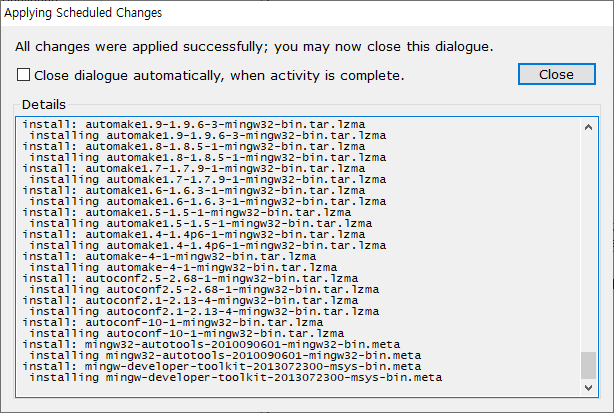
다 깔면 아래 화면이 나타난다. Close 누르고 종료하면 된다.
cmd창에 gdb –version을 입력한 후 엔터.
e:\Run_Files\MinGW\bin>gdb –version
GNU gdb (GDB) 7.6.1
Copyright (C) 2013 Free Software Foundation, Inc.
License GPLv3+: GNU GPL version 3 or later <http://gnu.org/licenses/gpl.html>
This is free software: you are free to change and redistribute it.
There is NO WARRANTY, to the extent permitted by law. Type “show copying”
and “show warranty” for details.
This GDB was configured as “mingw32”.
For bug reporting instructions, please see:
<http://www.gnu.org/software/gdb/bugs/>.
위와같이 나온다면 성공이다.
vsCode에서
launch.json
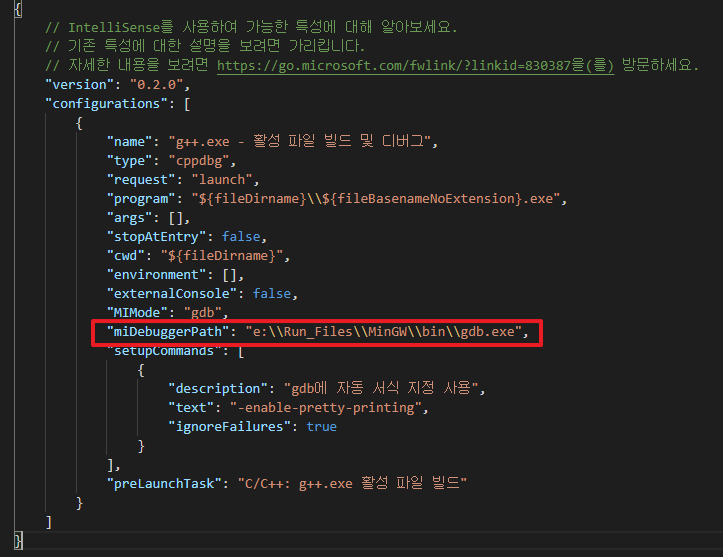
로 경로를 지정해주면 된다.

씹어먹는C에서 나온 예제를 가지고 디버깅해보자.
참조페이지